Kuro
Home

Create

  • Images & videoEvery image and video model, plus the tools to finish them
  • Voice & musicVoice-overs in saved voices, music tracks and transcripts
  • StoryboardA whole video, scene by scene, past any model's length limit
  • CarouselsPhoto carousels with your words on every page

Optimize

  • Remake a videoPaste a video you saved, get its shots and make your own
  • Viral PotentialScore a clip before you post it, moment by moment, on five signals
  • Add subtitlesBurn word-timed captions into a clip, in multiple styles

Organize

  • LibraryEverything you make, named and tagged for you
  • SubjectsThe same face or product in every picture and clip

Publish

  • CalendarPlan the month and post to TikTok, Instagram, YouTube and X

Automate

  • RecipesFill in a proven recipe, or build your own workflow
  • PresetsStyles, motion, lighting and framing — the whole shelf a recipe picks from
  • MotionCamera moves, each shown as a short clip with its own example
  • Agents & MCPAsk Kuro in chat, or drive the studio from Claude or ChatGPT

Use cases

  • EcommerceYour phone photo, lit like a studio, and the ads that sell it
  • AI influencersOne face and one voice, in every post and brand deal
  • ExplainersTeach anything in a video, scene by scene
  • Micro DramaA vertical series with the same cast, episode after episode
  • ViralsThe formats the feed stops for: performances, time-lapses, trends

Resources

  • CatalogReady-made recipes and styles, from Kuro and its users
  • ModelsAll 57, what each does and what it costs in credits
  • Free toolsCompress, convert, trim and mute videos, or save their sound, in your browser, free
  • GuidesHow to prompt each model, with our own work as proof
  • ComparisonsVeo 3.1 vs Seedance 2.5, and 9 more head-to-heads
  • ArenaEvery model, the same prompt, ranked — the first round is up
  • PricingWhat a credit buys, and what a month of them costs
  • Sign inBack to a studio you already have

Create

  • Images & videoEvery image and video model, plus the tools to finish them
  • Voice & musicVoice-overs in saved voices, music tracks and transcripts
  • StoryboardA whole video, scene by scene, past any model's length limit
  • CarouselsPhoto carousels with your words on every page

Optimize

  • Remake a videoPaste a video you saved, get its shots and make your own
  • Viral PotentialScore a clip before you post it, moment by moment, on five signals
  • Add subtitlesBurn word-timed captions into a clip, in multiple styles

Organize

  • LibraryEverything you make, named and tagged for you
  • SubjectsThe same face or product in every picture and clip

Publish

  • CalendarPlan the month and post to TikTok, Instagram, YouTube and X

Automate

  • RecipesFill in a proven recipe, or build your own workflow
  • PresetsStyles, motion, lighting and framing — the whole shelf a recipe picks from
  • MotionCamera moves, each shown as a short clip with its own example
  • Agents & MCPAsk Kuro in chat, or drive the studio from Claude or ChatGPT
  • EcommerceYour phone photo, lit like a studio, and the ads that sell it
  • AI influencersOne face and one voice, in every post and brand deal
  • ExplainersTeach anything in a video, scene by scene
  • Micro DramaA vertical series with the same cast, episode after episode
  • ViralsThe formats the feed stops for: performances, time-lapses, trends

Browse

  • CatalogReady-made recipes and styles, from Kuro and its users
  • ModelsAll 57, what each does and what it costs in credits
  • Free toolsCompress, convert, trim and mute videos, or save their sound, in your browser, free

Read

  • GuidesHow to prompt each model, with our own work as proof
  • ComparisonsVeo 3.1 vs Seedance 2.5, and 9 more head-to-heads
  • ArenaEvery model, the same prompt, ranked — the first round is up
Pricing
Sign inSign up nowSign upSign up now→
←Blog

Update · October 26, 2026

Kuro brings you what's new

When something new ships, Kuro brings it to the corner of your screen once, and What's new in the account menu shows a picture for every update.
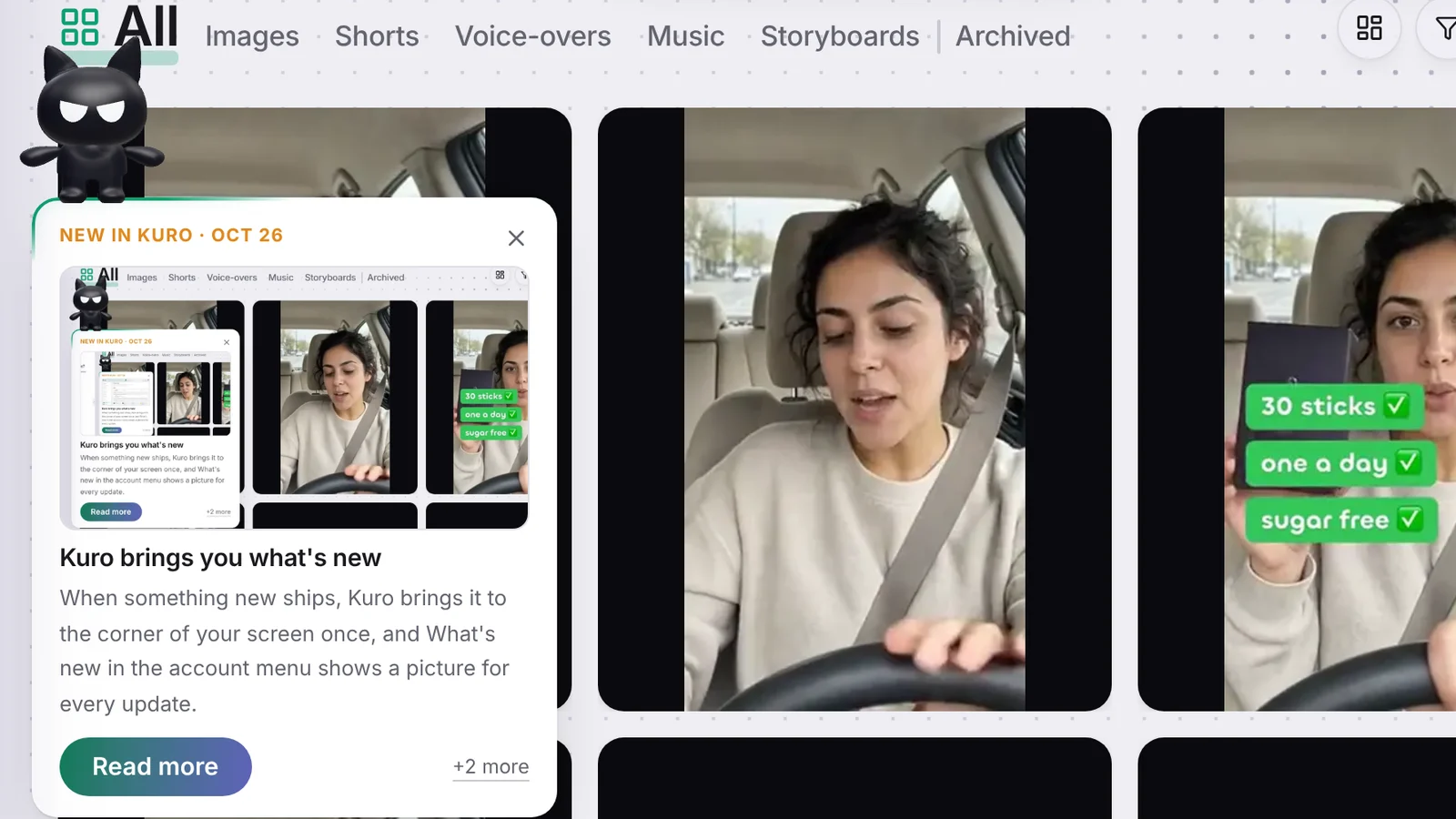
Kuro perched on the What's new card at the edge of the Library: a picture of the update, its title and line, Read more and +2 more.

Kuro changes most days, and until now the only place that said so was a dropdown inside the account menu. Unless you opened it, a new feature went by without you hearing about it.

Kuro brings the news

When something new ships, Kuro sits down on a card in the bottom-left corner the next time you open the app. The card shows the newest update’s picture, what it does, and Try it when there is a place to try it. If several things shipped since your last visit, +2 more opens the full list. Press the cross and he leaves.

He comes once per batch. Once the card has been on your screen, the update counts as seen on your account, so you won’t see it again on your phone or in Kuro Desktop. The next card comes with the next update.

A list with pictures

What’s new in the account menu is now a short list of the latest updates, each with its picture, its date and a New tag on the ones you haven’t seen. Press one to read its line and try it, or All updates for the blog.

More updates

  • Run your ComfyUI workflows in Kuro DesktopNovember 3, 2026
  • Run your ComfyUI workflows on your Comfy keyNovember 3, 2026
  • Free image tools, and every platform's sizesNovember 3, 2026
Kuro

The studio where you type what you’re picturing and get it back real. Images, clips, voice, music and complete videos in one connected studio.

  • @thekurooo
  • @meetkuroai

Product

  • Images & video
  • Voice & music
  • Storyboard
  • Carousels
  • Remake a video
  • Viral Potential
  • Add subtitles
  • Library
  • Subjects
  • Calendar
  • Recipes
  • Presets
  • Motion
  • Agents & MCP

Use cases

  • Ecommerce
  • AI influencers
  • Explainers
  • Micro Drama
  • Virals

Resources

  • Catalog
  • Models
  • Free tools
  • Guides
  • Comparisons
  • Arena

Company

  • Pricing
  • AI price index
  • Blog
  • Contact
  • Account & billing

Legal

  • Terms
  • Refunds
  • Privacy

© 2026 Kuro

English

Language

EnglishFrançaisРусский
LightAutoDark

Theme

LightAutoDarklight right nowdark right now

Qualia LP