Kuro
Home

Create

  • Images & videoEvery image and video model, plus the tools to finish them
  • Voice & musicVoice-overs in saved voices, music tracks and transcripts
  • StoryboardA whole video, scene by scene, past any model's length limit
  • CarouselsPhoto carousels with your words on every page

Optimize

  • Remake a videoPaste a video you saved, get its shots and make your own
  • Viral PotentialScore a clip before you post it, moment by moment, on five signals
  • Add subtitlesBurn word-timed captions into a clip, in multiple styles

Organize

  • LibraryEverything you make, named and tagged for you
  • SubjectsThe same face or product in every picture and clip

Publish

  • CalendarPlan the month and post to TikTok, Instagram, YouTube and X

Automate

  • RecipesFill in a proven recipe, or build your own workflow
  • PresetsStyles, motion, lighting and framing — the whole shelf a recipe picks from
  • MotionCamera moves, each shown as a short clip with its own example
  • Agents & MCPAsk Kuro in chat, or drive the studio from Claude or ChatGPT

Use cases

  • EcommerceYour phone photo, lit like a studio, and the ads that sell it
  • AI influencersOne face and one voice, in every post and brand deal
  • ExplainersTeach anything in a video, scene by scene
  • Micro DramaA vertical series with the same cast, episode after episode
  • ViralsThe formats the feed stops for: performances, time-lapses, trends

Resources

  • CatalogReady-made recipes and styles, from Kuro and its users
  • ModelsAll 57, what each does and what it costs in credits
  • Free toolsCompress, convert, trim and mute videos, or save their sound, in your browser, free
  • GuidesHow to prompt each model, with our own work as proof
  • ComparisonsVeo 3.1 vs Seedance 2.5, and 9 more head-to-heads
  • ArenaEvery model, the same prompt, ranked — the first round is up
  • PricingWhat a credit buys, and what a month of them costs
  • Sign inBack to a studio you already have

Create

  • Images & videoEvery image and video model, plus the tools to finish them
  • Voice & musicVoice-overs in saved voices, music tracks and transcripts
  • StoryboardA whole video, scene by scene, past any model's length limit
  • CarouselsPhoto carousels with your words on every page

Optimize

  • Remake a videoPaste a video you saved, get its shots and make your own
  • Viral PotentialScore a clip before you post it, moment by moment, on five signals
  • Add subtitlesBurn word-timed captions into a clip, in multiple styles

Organize

  • LibraryEverything you make, named and tagged for you
  • SubjectsThe same face or product in every picture and clip

Publish

  • CalendarPlan the month and post to TikTok, Instagram, YouTube and X

Automate

  • RecipesFill in a proven recipe, or build your own workflow
  • PresetsStyles, motion, lighting and framing — the whole shelf a recipe picks from
  • MotionCamera moves, each shown as a short clip with its own example
  • Agents & MCPAsk Kuro in chat, or drive the studio from Claude or ChatGPT
  • EcommerceYour phone photo, lit like a studio, and the ads that sell it
  • AI influencersOne face and one voice, in every post and brand deal
  • ExplainersTeach anything in a video, scene by scene
  • Micro DramaA vertical series with the same cast, episode after episode
  • ViralsThe formats the feed stops for: performances, time-lapses, trends

Browse

  • CatalogReady-made recipes and styles, from Kuro and its users
  • ModelsAll 57, what each does and what it costs in credits
  • Free toolsCompress, convert, trim and mute videos, or save their sound, in your browser, free

Read

  • GuidesHow to prompt each model, with our own work as proof
  • ComparisonsVeo 3.1 vs Seedance 2.5, and 9 more head-to-heads
  • ArenaEvery model, the same prompt, ranked — the first round is up
Pricing
Sign inSign up nowSign upSign up now→
←Blog

Update · October 16, 2026

Arrows on the storyboard

Drag the arrow on a scene onto another to link the two, or let go on empty board to add a new scene right there.
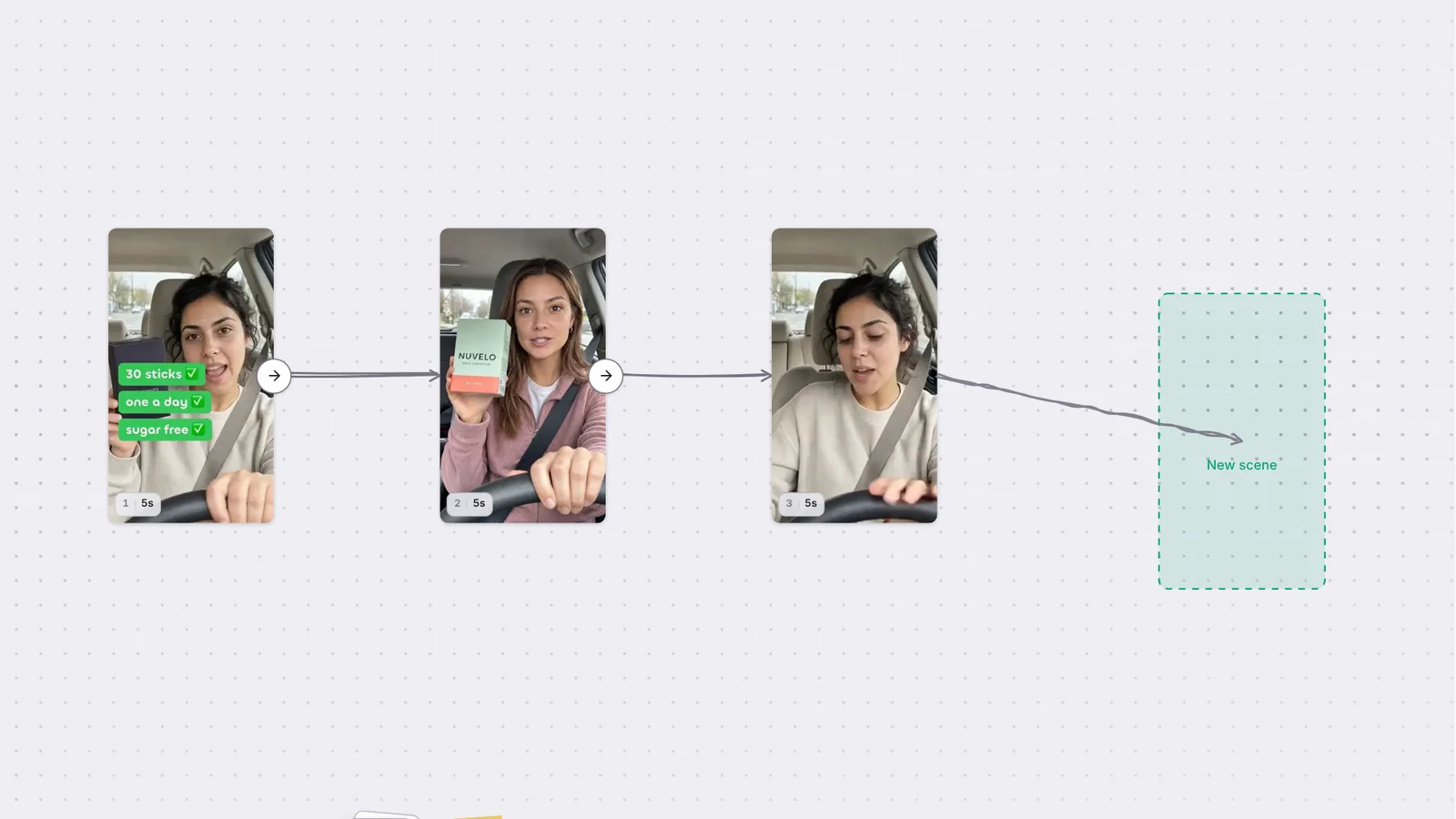
A storyboard of three scenes linked by arrows, with a fourth arrow pulled from the last scene onto empty board, where a dashed New scene card waits.

The arrow on a scene card is now something you can hold. It wakes as your pointer comes near and leans toward it.

Link two scenes

Press the arrow and pull. The line follows your pointer like a rope and straightens itself out. Bring it close to another scene and the arrowhead springs onto it and the card lifts. Let go and the two are linked.

Add a scene where you let go

Let go over empty board instead and a dashed New scene card shows where it will land. Release, and the new scene appears right there.

More updates

  • Run your ComfyUI workflows in Kuro DesktopNovember 3, 2026
  • Run your ComfyUI workflows on your Comfy keyNovember 3, 2026
  • Free image tools, and every platform's sizesNovember 3, 2026
Kuro

The studio where you type what you’re picturing and get it back real. Images, clips, voice, music and complete videos in one connected studio.

  • @thekurooo
  • @meetkuroai

Product

  • Images & video
  • Voice & music
  • Storyboard
  • Carousels
  • Remake a video
  • Viral Potential
  • Add subtitles
  • Library
  • Subjects
  • Calendar
  • Recipes
  • Presets
  • Motion
  • Agents & MCP

Use cases

  • Ecommerce
  • AI influencers
  • Explainers
  • Micro Drama
  • Virals

Resources

  • Catalog
  • Models
  • Free tools
  • Guides
  • Comparisons
  • Arena

Company

  • Pricing
  • AI price index
  • Blog
  • Contact
  • Account & billing

Legal

  • Terms
  • Refunds
  • Privacy

© 2026 Kuro

English

Language

EnglishFrançaisРусский
LightAutoDark

Theme

LightAutoDarklight right nowdark right now

Qualia LP