Update ·
Selecting several things, at the foot of the screen
When you select several pictures or clips, their actions now sit in a bar at the bottom of the screen that follows your light or dark theme.
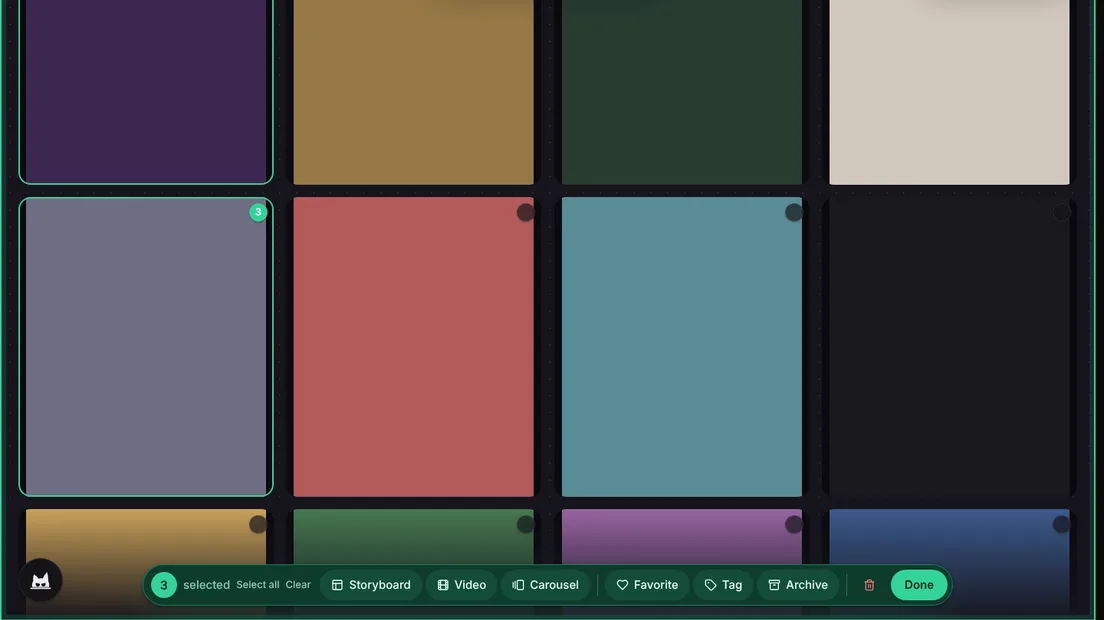
When you select several things in the Library, the actions for them used to appear in a bar across the top of the screen. It was always drawn in the opposite theme, so in dark mode it was a black strip on a black page and easy to miss.
A bar at the bottom
The bar now sits at the foot of the screen, under what you selected, like a dock. It shows how many items you picked, with Select all and Clear beside the count, then everything you can do with them: make a storyboard, a video or a carousel, schedule them, mark them as favorites, tag them, archive them or delete them. Done closes it.
In dark mode the bar is a deep emerald, the same green that marks what you selected, so it stands out from the page, and in light mode it is white. The selected items keep their bright outline, so you can always see what the bar will act on.
On a phone
On a phone the actions become a grid of large buttons with an icon and a short word, so each one is easy to reach with your thumb. The prompt at the bottom of the Library steps aside while you select and comes back when you press Done.