Update ·
Read your storyboard as a script
The storyboard's new Script room shows every scene's lines in order, beside its picture and under the episode's clock, ready to edit.
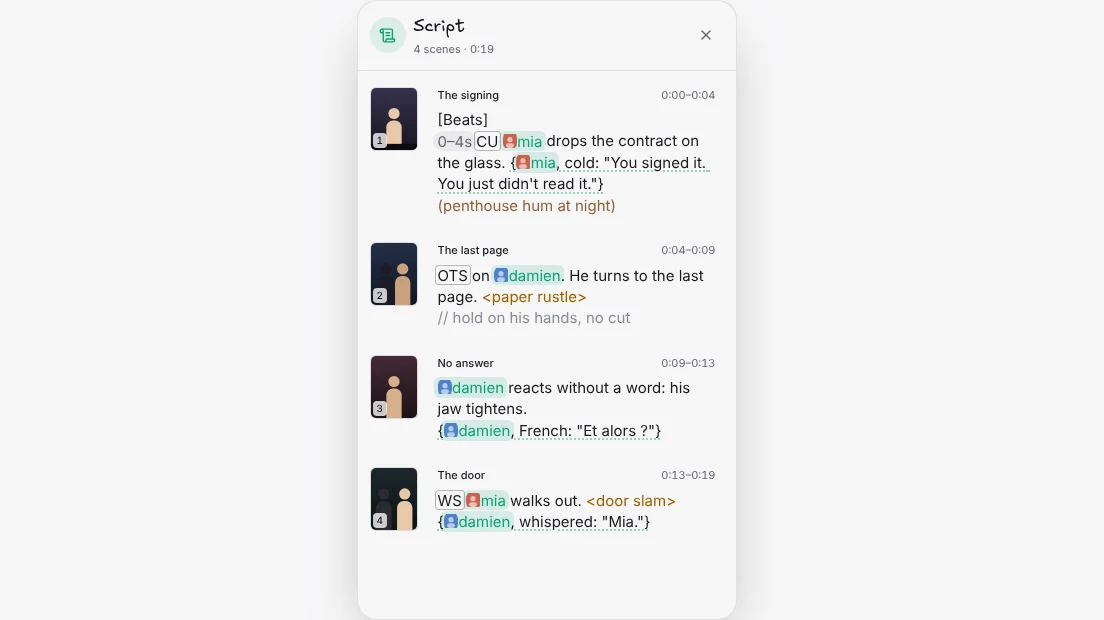
A storyboard is a board of pictures, but a micro drama is written as a script. The Script room puts the two side by side: every scene’s brief, in the order the episode plays, next to its still and under a running clock.
Where it is
Open a storyboard and press the new Script door in the column on the left, under Setup. The header tells you how many scenes the cut has and how long it runs. Each scene shows its number, its title and where it sits in the episode, like 0:04–0:09, counted from the real length of any clip that has already been filmed.
Write the whole episode in one place
Each scene’s brief is the same text you see in the scene’s details, painted the same way: lines are underlined, sounds are in amber, shot sizes and timings sit in small chips, and a character’s face appears on her tag. Click into any scene and edit it. When you click away, the change is saved to that scene and can be undone like any other edit.
Nothing in the Script room spends credits. To film a scene, click its picture to open its details, and make the take from there.