Update ·
Write who says what in a clip
Type /line, /shot, /react, /sfx or /ambient in a clip prompt, and Kuro rewrites your lines for whichever video model makes the shot.
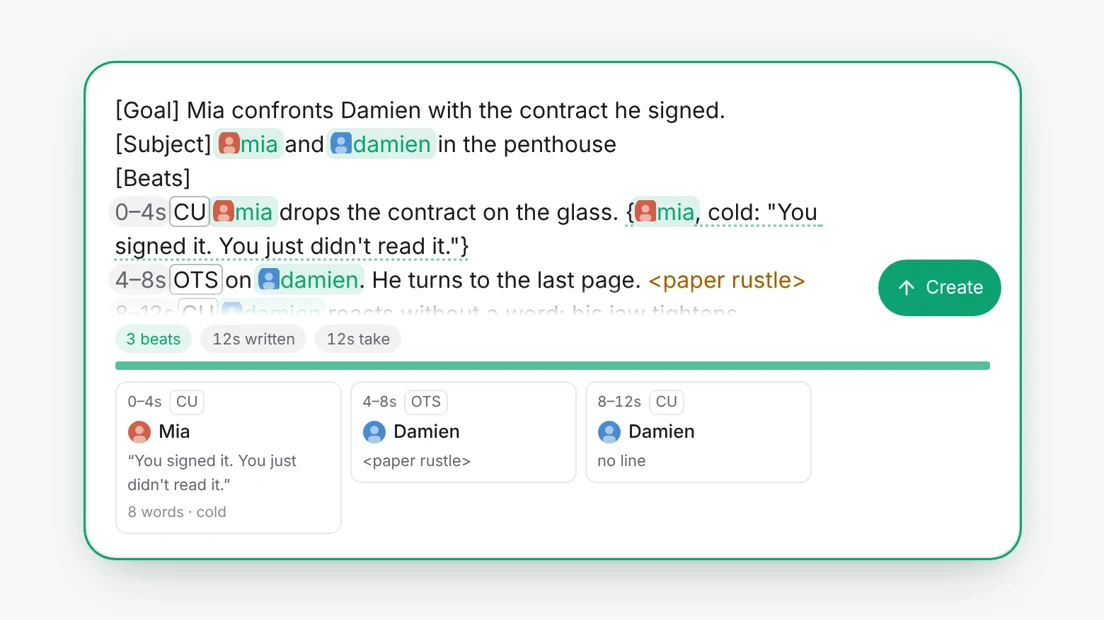
A micro drama is a string of short shots, and most of them are someone saying a line or someone reacting to one. Clip prompts can now say that directly: who speaks, how, in which language, how close the camera is, and what we hear.
Five new commands
Type / in a clip prompt in the Library, or in a scene of a storyboard, and the list now offers five more ways to write:
- /line writes a spoken line for one of your characters, like
{@mia, cold: "You signed it."}. Pick the character and type the words between the quotes. Add a delivery such as cold or whispered, or a language such as French, before the colon. - /shot puts a shot size at the head of a beat: close-up, extreme close-up, medium close-up, medium, wide or over the shoulder.
- /react writes a silent reaction for the person listening, so they don’t mouth the other person’s words.
- /sfx writes a sound effect between angle brackets, like
<door slam>. - /ambient writes the sound under the whole shot, like
(rain on the window), on a line of its own.
They work at any length, not only on long takes, because most drama shots last three to eight seconds.
Written once, read by every model
Each video model wants dialogue written its own way. Seedance reads lines in braces with the language named before each one, Veo wants quoted lines with sound effects on their own lines, and Kling wants the words spelled out and the sound in its own sentence. You write the brief once, and when you press Create Kuro rewrites it for the model you picked. Your prompt stays exactly as you typed it, so you can switch a scene from Seedance to Veo without changing a word.
See the shot as you write it
Your characters’ faces now appear on their tags, lines are underlined, sounds are in amber, and shot sizes and timings sit in small chips. When your prompt has a Beats block, a row of cards under it shows each beat with its shot, who is in it, their line and how many words it has. Press a card to jump to that beat in the text.