Kuaishou · Shorts · standard
Kling Motion Control
Drives a still image with the motion of a video. Prompt optional, 720p or 1080p.
What it costs
| 5s · 720p | 29.5 credits | ≈ $0.70 |
| 5s · 1080p | 50 credits | ≈ $1.19 |
Dollar figures are approximate, at the Starter plan's rate of $19.00 for 800 credits.
What AI video costs per second: 6 findings
What it takes
| Aspect ratios | 16:9 4:3 1:1 3:4 9:16 21:9 |
| Resolutions | 720p 1080p |
| Duration | seconds |
| Reference images | 1 |
| Reference videos | 1 |
| Required inputs | image, video |
When to reach for it
Kuaishou's motion-transfer model: supply an image and a driving video, and the subject in the image takes on the motion in the video. The prompt is optional, because the two required inputs carry the specification between them.
It occupies the same job as P-Video Animate and costs roughly twice as much, which makes the choice a fidelity question rather than a feature one. Try the cheaper model first and come here when the transfer is not holding. Where it tends to win is on faces and on motion with fast direction changes, both of which are where cheaper transfer models smear.
Duration follows the driving video, three to fifteen seconds, and is not yours to set. Six aspect ratios and a choice of 720p or 1080p. Audio is not forced, unlike Animate, so the sound of the result stays a separate decision. As with any transfer model, the driving clip matters more than anything you can type: clean, single-subject, unambiguous motion.
How to prompt Kling Motion Control
Describe what you want in your own words and Kuro writes the prompt for you. If you would rather write it yourself, this is what Kling Motion Control responds to.
Kling Motion Control makes the subject of an image perform the motion of a source video. The image is identity, not the first frame; the video sets only the action.
The image sets the character, the background and everything else on screen, so pick one that already looks like the finished shot.
The prompt is optional and is direction on top of the performance: say what must stay unchanged — face, hair, outfit, proportions — and any emphasis or added element. Never restate the action; pace, steps, gestures and camera are the video's job.
Choose a source with one performer, full body and head (and hands) in frame, steady moderate motion, a still or slow camera and a clean, well-lit background. Fast or chaotic motion, a busy handheld camera and cuts are the usual reasons a transfer fails.
Use a front-facing subject image with the limbs in view, framed like the source; hands hidden in pockets force the model to invent them. The output takes its shape from the source.
The character turns where the source performer turns, not where the image faces. Stylised or anime characters hold more steadily than photoreal ones.
The same advice covers P-Video Animate and Genjutsu Motion Transfer. Their pages note what differs.
What it can't do
- One source video and one subject image. No first or last frame, and no voice channel.
- The source must run at least three seconds and no more than fifteen; trim it first. The clip is exactly as long as the source.
- The image must be a JPG or PNG under 10 MB, between 340 and 3,850 pixels, with an aspect no more extreme than 1:2.5; the source an MP4 or MOV under 100 MB.
- It keeps the source's audio unless you switch it off. 720p or 1080p.
Use something else when…
- The subject should speak a line rather than copy a movement: OmniHuman 1.5.
- The source's own scene and camera should stay and only the person in it change: P-Video Replace.
- There is no source performance, only a movement you can describe: Seedance 2.5.
Made with it
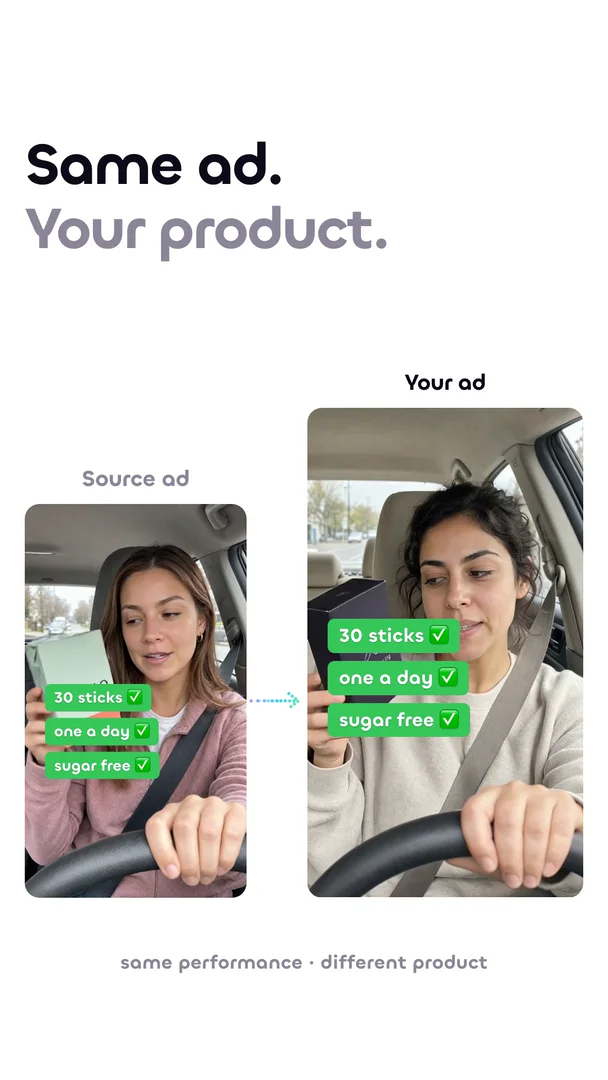
Remake the ad that already works
Same gestures, same beats. Your product.
Kling Motion Control is one pick in the composer.
Every model in this catalog runs from the same prompt bar, priced in the same credits.
Sign up now